
USAA DriveSafe
USAAAuto & Vehicles
3.714.15K Reviews
- Version
- 4.1.1.135062
- Installs
- 1.00M
- Age Rating
- Everyone
Screenshots

Our Review of USAA DriveSafe
 Analysis by Appyee
USAA DriveSafe is an Auto & Vehicles app from USAA that focuses on helping eligible members build safer driving habits. I approached it less like a traditional navigation tool and more like a companion for reviewing how I drive during ordinary trips. That distinction matters: it is not meant to replace a map, roadside service, or a full vehicle-maintenance app. Its value comes from fitting driving feedback into the routine you already have.
The first thing to understand is availability. The app is offered in select states, so eligibility and location should be checked before you plan your driving routine around it. It is free, rated for Everyone, and the current version is 4.0.0.135029. USAA is the developer, and the app has reached over a million installs with an average rating of 3.8 from roughly sixty thousand ratings. Those figures suggest a substantial user base, but they also tell me to keep expectations realistic: this is a practical insurance-related driving tool, not a universally loved coaching system.
How I would build a reliable everyday routine
I would make the routine easy enough to keep on busy days: check the setup before heading out, leave the phone alone while driving, and choose one calm moment each week to reflect. I’d also pause and revisit the setup after changing phones or adjusting battery settings, since a small change there can disrupt a habit that had been working. That gives me a practical way to tell whether a rough trip reflects driving conditions or a routine that needs attention.
Start with one normal week, not your best driving
My recommended starting point is simple: install the app, complete the available setup, and then use it during your usual week. I would not deliberately take quiet roads, drive more cautiously than normal, or change every habit at once. A baseline is useful only when it reflects school runs, commuting, errands, parking lots, traffic lights, and the occasional rushed trip.
This is especially important for an app connected to driving behavior. A single journey can feel unrepresentative, while repeated ordinary trips reveal patterns that are easier to act on. If I notice that my least comfortable moments happen when leaving work late, the useful response is not merely to stare at a score. I would ask what changed: was I accelerating too quickly, braking later than usual, or checking the phone before moving?
Before driving, I would make the phone part of the routine rather than an afterthought. Mount it securely if I need to see another app, silence unnecessary notifications, and avoid touching the screen once the car is moving. This habit is valuable even when using a driving-monitoring tool, because the app should encourage attention on the road rather than become another distraction.
A realistic example is a weekday trip to pick up a child after work. The route may include slow traffic, a short highway section, and a crowded parking area. Instead of judging the trip emotionally, I would review it later and compare it with similar journeys. If the same kind of trip repeatedly produces uncomfortable events, I can adjust earlier: leave more space, begin slowing sooner, or stop trying to make up time after a delayed departure.
Review after the car is parked
The most useful habit is separating driving from reviewing. I would finish the trip, park safely, and only then look at the app. That keeps feedback from competing with steering, traffic awareness, or passengers. It also makes the review more thoughtful. In the moment, a driver may blame traffic for everything; after parking, it is easier to notice which decisions were actually under personal control.
I would look for repetition rather than treating every alert or result as a verdict on my character. If one trip looks worse than another, that does not automatically mean I drove badly. Weather, road design, congestion, and unexpected behavior from other drivers can all affect a journey. The practical question is whether the same pattern appears often enough to deserve a change.
One non-obvious benefit of this approach is that it turns the app into a feedback loop instead of a passive record. The loop is short: drive normally, review when stationary, choose one behavior to improve, and check whether the next group of trips feels different. Trying to fix everything at once usually makes the process vague. Choosing one change gives the app a clearer purpose.
Keep the phone and the vehicle relationship consistent
If more than one person uses the same vehicle, I would pay close attention to who is carrying the phone during each trip. A driving app can only be useful when the device and the driver pairing make sense. Sharing a car does not necessarily mean sharing one phone, and switching between phones without a consistent routine can make personal feedback harder to interpret.
The same principle applies if I regularly drive different vehicles. I would avoid assuming that a result from a small city car should be interpreted exactly like a result from a larger vehicle. The app can help me examine my behavior, but it cannot remove every difference created by seating position, visibility, road feel, or vehicle response. That is a reason to use the information as guidance rather than as an absolute measurement of skill.
Settings worth checking before relying on the app
I would begin by checking the app’s available setup screens and the phone’s relevant system settings. Because this is a driving-monitoring product, the basic conditions for reliable operation matter: the phone should be carried consistently, the app should be allowed to function as intended, and battery-saving behavior should not interfere with a trip. The exact choices available can vary by phone and operating system, so I would read each prompt instead of tapping through automatically.
Notifications deserve a deliberate decision. Helpful reminders can support a repeatable routine, but too many alerts can become background noise. I would keep only the notifications that help me remember a useful action, such as reviewing a completed trip, and silence anything that encourages unnecessary phone checking while I am preparing to drive.
Battery management is another practical trade-off. Aggressive power-saving settings may be good for extending battery life, yet they can interfere with apps that need to recognize a journey. I would check whether the phone is restricting background activity and make sure the device has enough charge before a long day of driving. This is not a reason to disable every battery safeguard permanently; it is a reason to understand how the phone treats this particular app.
Privacy and comfort also belong in the setup conversation. Some drivers are happy to use a monitoring app because the feedback supports safer habits, while others dislike the feeling of being evaluated during every trip. I would decide that honestly before enrolling in a routine. If the process makes me anxious, I may focus too much on the app and too little on the road. In that case, a general defensive-driving course or a simple personal habit checklist could be a better fit.
Use repeatable shortcuts, not risky phone shortcuts
When I say “shortcuts,” I mean preparation habits rather than pressing buttons during a journey. I would keep the phone mounted or stored in the same place, start the trip in the same order, and wait until I am parked before opening the review screen. Consistency reduces small mistakes and makes results easier to compare.
I would also create a short pre-drive checklist that takes only a few seconds: seat adjusted, mirrors checked, phone secured, route understood, and distractions put away. The checklist is valuable because it prevents the app from becoming the only safety ritual. USAA DriveSafe can support reflection on driving, but it should sit inside a broader routine that begins before the car moves.
For frequent commuters, I would group trips by purpose in my own notes rather than expecting every journey to be directly comparable. A commute, a school pickup, and a late-night grocery run have different traffic and attention demands. If I review them as one undifferentiated stream, useful patterns may disappear. Separating them mentally helps me ask better questions about when and why a problem happens.
Another effective pattern is to set a weekly review moment while parked at home. I would look for one repeated behavior, write down the adjustment I want to try, and then leave the app alone until the next safe review. This prevents compulsive checking after every trip. It also turns feedback into a manageable experiment: change one habit, observe several ordinary journeys, and decide whether the change helped.
Where the app is strongest
In my view, the strongest use case is for a USAA member who wants a structured reason to pay attention to everyday driving. The app gives that person a recurring prompt to think about the connection between decisions and outcomes. It can be particularly useful for a new driver who needs a calm review routine, a parent helping a young driver form habits, or an experienced driver who wants to challenge complacency.
It is also a sensible option for someone who does not want a separate navigation ecosystem. Many drivers already have a favorite map app and do not want their safety tool to compete with route planning. The two roles can remain separate: use navigation for directions, and use DriveSafe for driving-focused reflection. That division is cleaner than expecting one app to do everything.
Compared with a navigation app, this product is less about finding the fastest route and more about examining how the trip was driven. Compared with a vehicle-maintenance app, it is less concerned with tire pressure, service schedules, or mechanical records. Compared with a dashcam, it is not primarily a visual record of what happened on the road. Those alternatives may be better for their specific jobs, but they do not replace the focused behavior loop that makes this app worthwhile.
Where the experience can become frustrating
The rating of 3.8 shows that the experience is useful for many people but not frictionless. I can understand why. A driving app depends on a phone being present, configured correctly, and treated consistently. If I change devices, share driving duties, use strict battery controls, or forget the setup routine, the feedback may feel less dependable than expected.
Availability in select states is another important limitation. Someone may like the idea immediately but still be unable to use it based on location or eligibility. I would check that early rather than spending time designing a routine around an app that is not available for my situation.
I would also avoid treating the app’s results as a complete safety assessment. No app sees every part of a drive in the same way a trained instructor might. It cannot fully understand road conditions, passenger emergencies, poor visibility, or the intentions of other drivers. A result can prompt a useful conversation, but it should not encourage overconfidence or shame.
Drivers who want detailed navigation, mechanical tracking, or a video record should choose a dedicated alternative for those needs. Likewise, people who dislike any form of driving monitoring may be happier with offline habits, professional instruction, or a basic reminder system. The free price removes a financial barrier, but it does not remove the need to accept the app’s approach.
Small decisions that improve the value of feedback
I would avoid reviewing a trip immediately after an upsetting incident. If another driver cuts me off, my first reaction is likely to be defensive, and I may interpret every result through that emotion. Waiting until I am calm produces a more useful assessment. The goal is not to prove that I was right; it is to identify what I can control next time.
I would also compare like with like whenever possible. A short trip through a quiet neighborhood should not be judged against a congested urban commute as though the conditions were identical. Looking at similar routes and times makes changes easier to evaluate. This is a subtle but important trade-off: more data is not automatically better if the comparisons are poorly chosen.
For families, I would keep the discussion supportive. Asking a new driver what they noticed is more productive than announcing that the app says they failed. The driver can explain context, while the app provides a starting point for reflection. That approach preserves trust and makes it more likely that safer habits continue after the novelty fades.
For experienced drivers, I would use the app to test assumptions. Many confident drivers believe their habits are already consistent, but routine can hide late braking, hurried starts, or unnecessary lane changes. A structured review can expose those tendencies without requiring a dramatic lifestyle change. The improvement may be modest, yet repeated modest improvements are exactly where a daily driving tool earns its place.
My verdict after looking at the complete workflow
USAA DriveSafe makes the most sense when I treat it as a habit-building companion, not as a universal driving dashboard. Its best qualities are its focused purpose, free access, and ability to fit beside the navigation and vehicle apps I already use. The app is most valuable when I review trips only while parked, keep the phone setup consistent, and use repeated patterns to choose one practical improvement at a time.
I would recommend it to eligible USAA users who want accountability during ordinary driving, especially families and drivers who appreciate structured feedback. I would not recommend making it the sole source of safety judgement, and I would steer someone toward a different tool if their main need is navigation, maintenance tracking, or video evidence.
The release history also gives the product a clear place in the USAA mobile lineup: it was released on January 23, 2019, and the current build is 4.0.0.135029. More important than the version label, though, is whether the app fits a routine I can actually maintain. If I can prepare before moving, review only after parking, and respond to patterns without obsessing over every trip, it becomes a useful nudge toward calmer driving. If I cannot keep that routine or the app is unavailable where I live, its practical value drops quickly.
My final advice is to try it with ordinary expectations. Do not install it looking for a replacement for maps, a mechanic, or an instructor. Install it if you want a repeatable way to notice driving habits that are easy to overlook. Used with that narrow purpose, it can turn routine journeys into opportunities for safer decisions without demanding that the app take over the entire driving experience.
Privacy and Permissions
See what permissions an app requests and how it handles your data.
- Location
- approximate location (network-based), precise location (GPS and network-based)
- Phone
- read phone status and identity
- Wi-Fi connection information
- view Wi-Fi connections
- Device ID & call information
- read phone status and identity
- Other
- view network connections, pair with Bluetooth devices, full network access, change your audio settings, run at startup, control vibration, prevent device from sleeping
Verdict
Strengths of USAA DriveSafe
- Encourages safer driving with personalized feedback and coaching.
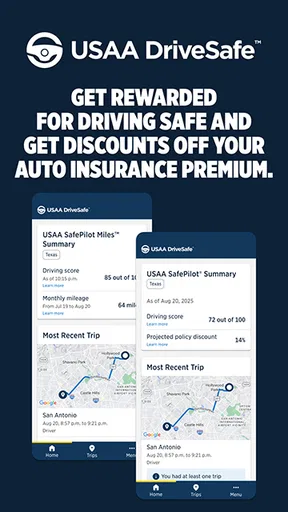
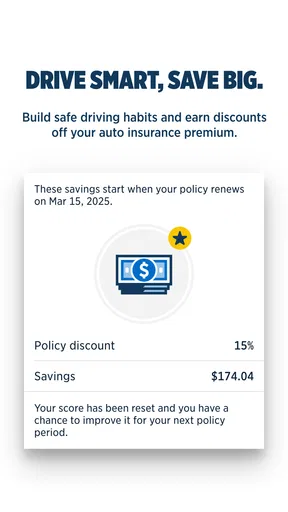
- Can help identify driving habits that may qualify for insurance savings.
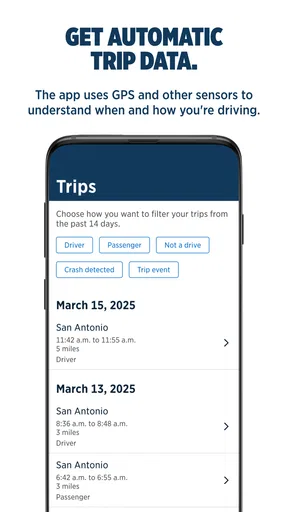
- Tracks trips automatically, reducing the need for manual logging.
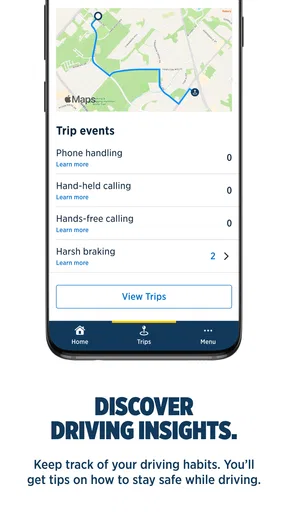
- Useful trip details help drivers understand where risks occur.
- Available for eligible USAA members at no separate app charge.
Limitations of USAA DriveSafe
- Requires consistent phone access and permissions for reliable tracking.
- Background location use may increase battery consumption.
- Driving scores can be affected by phone or GPS inaccuracies.
- Insurance savings and eligibility vary by driver, state, and policy.
- Some users may find continuous driving monitoring intrusive.
Other Releases by USAA
View All
USAA Mobile
Finance4.7
Similar Picks in This Category
View All
Android Auto
Google LLC4.1

maxim — order a taxi & food
PT. SITO4.7

Штрафы ГИБДД: проверка с фото
Pays LLC – Штрафы ГИБДД4.7

Номерограм – проверка авто
Авто Ассист4.8

Дром Авто
Дром4.9

Frequently Asked Questions
What is USAA DriveSafe, and how does it work?
USAA DriveSafe is a telematics program designed to evaluate driving habits through a compatible mobile app and, in some cases, additional enrollment requirements set by USAA. Depending on the program version and your location, it may monitor factors such as acceleration, braking, cornering, phone distraction, mileage, and driving times. The collected information can be used to provide feedback and may influence eligible insurance savings.
Is USAA DriveSafe available to every USAA member?
Availability can depend on your state, insurance policy, eligibility, and the specific DriveSafe program offered by USAA at the time you enroll. Not every member or vehicle may qualify, and some drivers may need to meet participation conditions before receiving a discount. Before downloading, check the latest terms in the USAA app, your policy documents, or the official USAA website because program rules can change.
Does USAA DriveSafe track my location and driving behavior?
The app may use your phone’s location services, motion sensors, and other device permissions to identify trips and assess driving-related patterns. This can include information about when and where a trip occurred, mileage, speed-related events, braking, acceleration, and phone handling, depending on the version of the program. Review the privacy notice and permission requests carefully so you understand what data is collected and how USAA uses it.
Can using USAA DriveSafe lower my insurance premium?
USAA DriveSafe may offer an opportunity to receive a discount or other insurance-related benefit when you participate and demonstrate qualifying driving habits, but savings are not guaranteed for every driver. The amount can vary according to state regulations, policy details, driving results, and program rules. In some situations, poor driving scores may reduce the potential discount, so read the enrollment terms before opting in.
What should I do if USAA DriveSafe misses a trip or records it incorrectly?
Trip detection can be affected by disabled location services, battery-saving settings, weak GPS signals, limited permissions, phone placement, or connectivity problems. Make sure the app is updated and has the permissions it needs, then review its troubleshooting guidance. If a trip remains inaccurate or your participation status appears wrong, contact USAA support through the official app or website and keep any relevant trip details available.
